
Key takeaways
- Compare five compact Ryzen mini PCs for office, design and development work, with specs, ports, memory, storage and display support explained clearly.
A compact Ryzen mini PC can carry a full working day without filling a desk, yet the choice is not only about core count. Memory capacity, storage speed, display outputs, wired networking and cooling behaviour decide whether a small box stays quiet during long calls, keeps many browser tabs open, and still handles large documents, code builds or layered design files without slowing down. Picking the wrong combination means living with a machine that feels cramped every afternoon.


This guide is for office workers, developers, designers, analysts and small-team leads who want a tidy Windows desktop that fits behind a monitor or beside a laptop dock. The five models below were chosen from names and specs on Amazon pages, with attention to Ryzen processors, memory, storage, ports and multi-display support for professional applications.
Quick Picks
As an Amazon Associate we earn from qualifying purchases
| Product | Best for | Key spec from title |
|---|---|---|
| Beelink SER8 Mini PC Ryzen 7 8745HS 16GB DDR5 500GB SSD | A tidy desk with three displays and everyday office work | Ryzen 7 8745HS, 16GB DDR5, 500GB PCIe 4.0 SSD |
| MINISFORUM UM790 Pro Mini PC Ryzen 9 7940HS 32GB DDR5 1TB SSD | Heavy multitasking with large files and many open apps | Ryzen 9 7940HS, 32GB DDR5, 1TB PCIe 4.0 SSD |
| GMKtec NucBox K8 Plus Mini PC Ryzen 7 8845HS 32GB DDR5 512GB SSD | A wired desk with dual networks and an external graphics dock | Ryzen 7 8845HS, 32GB DDR5, 512GB PCIe 4.0 SSD |
| Beelink SER9 Pro Mini PC Ryzen AI 9 HX 370 32GB LPDDR5X 1TB SSD | AI-assisted work and demanding creative software | Ryzen AI 9 HX 370, 32GB LPDDR5X, 1TB PCIe 4.0 SSD |
| MINISFORUM UM890 Pro Mini PC Ryzen 9 8945HS 32GB DDR5 512GB SSD | A four-display workstation with room to grow memory later | Ryzen 9 8945HS, 32GB DDR5, 512GB PCIe 4.0 SSD |
How to Choose
Match the processor to the workload
A Ryzen 7 chip with eight cores and sixteen threads covers documents, spreadsheets, video calls, email and browser research with ease, while a Ryzen 9 chip adds headroom for compiling code, running virtual machines, rendering drafts or working with very large datasets. The Ryzen AI 9 HX 370 goes further with twelve cores and twenty-four threads, which suits people who run several demanding tools at once. Look at boost clocks too: the models here reach 4.9GHz, 5.1GHz or 5.2GHz, and a higher ceiling helps short bursts such as opening a large project or exporting a file. Choose the chip for the heaviest task you repeat each week, not for the lightest one.
Weigh memory and storage before anything else
Memory decides how many applications can stay open without the system swapping to disk, so 16GB suits focused office work while 32GB gives developers, designers and analysts far more breathing room. Check whether memory is soldered or fitted in SO-DIMM slots, because a soldered 32GB cannot grow later, whereas a machine with two slots can move toward 64GB or 96GB when projects grow. Storage matters in a similar way: a 512GB or 1TB PCIe 4.0 SSD loads projects quickly, and a second M.2 slot lets you keep work files apart from the system drive. Confirm the exact configuration in the listing title before ordering.
Count displays, ports and network links
Professional desks often run two, three or four monitors, so count the outputs on the listing before you buy. HDMI, DisplayPort and USB4 each carry a display, and the machines here support three or four screens through different combinations of those ports. USB4 also connects fast docks and external drives, while a second 2.5G Ethernet port helps anyone who keeps a wired office network alongside a separate lab or storage network. Look for enough USB-A ports for a keyboard, mouse, headset and external drive, plus WiFi 6 or WiFi 6E and Bluetooth for wireless peripherals. A missing port becomes a daily annoyance.
Consider size, noise and daily placement
A mini PC earns its place by disappearing, so measure the space behind a monitor, under a shelf or inside a VESA mount before choosing. Most models here use a small square chassis with a fan, and cooling design affects how loud the unit becomes during a long video call or a sustained compile. Place the box where air can move around it, away from paper stacks and direct sun, and leave the vents clear. Think about cable routing as well: front USB ports suit a headset and a thumb drive, while rear ports keep permanent cables tidy. A quiet, cool machine is easier to live with than a slightly faster one that hums all day.
The 5 Best Options
Beelink SER8 Mini PC Ryzen 7 8745HS 16GB DDR5 500GB SSD
The Beelink SER8 is a balanced entry point for professional desks that need strong everyday performance in a small square chassis. Its Ryzen 7 8745HS carries eight cores and sixteen threads, so documents, spreadsheets, calls and browser research run side by side without constant waiting. Triple display support suits a main screen plus a reference monitor and a chat window, while WiFi 6 and a 2.5G LAN port cover both wireless and wired offices. With 16GB of DDR5 memory and a fast 500GB SSD, this model fits focused office work, writing, admin tasks and light design work very well.
Specs
- Processor: AMD Ryzen 7 8745HS, 8 cores and 16 threads, up to 4.9GHz
- Graphics: AMD Radeon 780M graphics
- Memory: 16GB DDR5 RAM
- Storage: 500GB PCIe 4.0 SSD
- Display outputs: Triple display through HDMI, DisplayPort and USB4, 4K at 144Hz
- Networking: WiFi 6, Bluetooth 5.2, 2.5G LAN
- System: Windows 11 Pro
Best for: Office workers who want a quiet, tidy three-display desk for documents, calls and research.
Watch out for: The 16GB memory and 500GB storage suit focused work, so heavy multitaskers may want a 32GB model instead.
MINISFORUM UM790 Pro Mini PC Ryzen 9 7940HS 32GB DDR5 1TB SSD
The MINISFORUM UM790 Pro moves up a class with a Ryzen 9 7940HS, 32GB of DDR5 memory and a 1TB PCIe 4.0 SSD, a combination that keeps large projects, many browser tabs and several applications open at once. Its Radeon 780M graphics handle everyday visual work and multiple high-resolution screens, while twin HDMI 2.1 outputs and twin USB4 ports give a multi-monitor desk plenty of connection choices. Dual PCIe 4.0 M.2 slots add storage flexibility, and WiFi 6E with Bluetooth 5.3 keeps wireless peripherals connected. This is a strong all-round workstation for analysts, developers and content workers.
Specs
- Processor: AMD Ryzen 9 7940HS, 8 cores and 16 threads, up to 5.2GHz
- Graphics: AMD Radeon 780M graphics
- Memory: 32GB DDR5-5600 RAM, maximum 64GB across two SO-DIMM slots
- Storage: 1TB PCIe 4.0 SSD, 2x PCIe 4.0 M.2 slots
- Display outputs: 2x HDMI 2.1 and 2x USB4
- Networking: WiFi 6E, Bluetooth 5.3, RJ45 2.5G LAN
- System: Windows 11 Pro
Best for: Analysts and developers who juggle large files, many tabs and several tools through a long working day.
Watch out for: Confirm the exact configured listing before ordering, because this model is also sold as a barebone without memory, storage or a system installed.
GMKtec NucBox K8 Plus Mini PC Ryzen 7 8845HS 32GB DDR5 512GB SSD
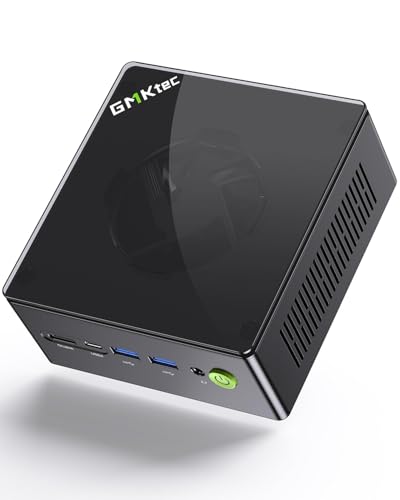
The GMKtec NucBox K8 Plus stands out for connectivity, pairing a Ryzen 7 8845HS with 32GB of DDR5 memory, a 512GB PCIe 4.0 SSD and an unusually rich set of ports. Dual 2.5G Ethernet links suit a desk that keeps office traffic apart from a lab or storage network, while an OCuLink port opens the way to an external graphics dock for heavier visual work. Two USB4 ports, HDMI 2.1 and DisplayPort 2.1 support up to four displays, and dual cooling fans help the compact chassis stay composed under load. This model fits network-aware professionals who value expansion options.
Specs
- Processor: AMD Ryzen 7 8845HS, 8 cores and 16 threads, up to 5.1GHz
- Graphics: AMD Radeon 780M graphics
- Memory: 32GB DDR5 RAM
- Storage: 512GB PCIe 4.0 SSD, dual SSD slots
- Display outputs: 2x USB4, HDMI 2.1 and DisplayPort 2.1, up to four displays
- Networking: Dual i226V 2.5G NIC, WiFi 6E, Bluetooth 5.2
- Expansion: OCuLink port, 6 USB ports in total
- Cooling: Dual cooling fan
Best for: Professionals who need dual wired networks, four displays and an external graphics dock option.
Watch out for: The 512GB drive fills quickly with large media libraries, so plan external or second-drive storage early.
Beelink SER9 Pro Mini PC Ryzen AI 9 HX 370 32GB LPDDR5X 1TB SSD
The Beelink SER9 Pro is the most powerful machine in this roundup, built around a twelve-core Ryzen AI 9 HX 370 with twenty-four threads and Radeon 890M graphics. That combination suits AI-assisted writing and coding tools, local model work, 4K video editing and complex design software, while 32GB of fast LPDDR5X memory and a 1TB PCIe 4.0 SSD keep large assets close at hand. Dual M.2 slots support up to 8TB of internal storage, and a built-in microphone and speakers help with calls when a headset is not handy. USB4, WiFi 6 and a 2.5G LAN port round out a polished professional package.
Specs
- Processor: AMD Ryzen AI 9 HX 370, 12 cores and 24 threads, up to 5.1GHz
- Graphics: AMD Radeon 890M graphics
- Memory: 32GB LPDDR5X RAM
- Storage: 1TB PCIe 4.0 SSD, dual M.2 PCIe 4.0 slots supporting up to 8TB
- Display outputs: Triple display, USB4, HDMI and DisplayPort
- Networking: WiFi 6, Bluetooth 5.2, 2.5G LAN
- Extras: Built-in microphone and speakers
- System: Windows 11 Pro
Best for: Creative professionals and AI-assisted workers who need the strongest processor and graphics in a mini chassis.
Watch out for: Memory is soldered, so the 32GB fitted at purchase cannot be upgraded later in the life of the machine.
MINISFORUM UM890 Pro Mini PC Ryzen 9 8945HS 32GB DDR5 512GB SSD

The MINISFORUM UM890 Pro pairs a Ryzen 9 8945HS with 32GB of DDR5 memory and a 512GB PCIe 4.0 SSD in a compact chassis made for a busy multi-display desk. Four display outputs through twin USB4 ports, HDMI and DisplayPort let a developer, trader or designer spread code, data and reference material across several screens at once. Dual RJ45 2.5G ports add wired flexibility, while Radeon 780M graphics cover everyday visual work without a separate card. Memory can grow toward 96GB across two DDR5 slots, which gives this machine a longer useful life as projects become heavier.
Specs
- Processor: AMD Ryzen 9 8945HS, 8 cores and 16 threads, up to 5.2GHz
- Graphics: AMD Radeon 780M graphics
- Memory: 32GB DDR5 RAM, maximum 96GB across two slots
- Storage: 512GB PCIe 4.0 SSD
- Display outputs: 2x USB4, 1x HDMI and 1x DisplayPort, four outputs in total
- Networking: 2x RJ45 2.5G LAN, Bluetooth 5.2
- Ports: 4x USB 3.2 ports
Best for: Multi-display professionals who want a fast Ryzen 9 workstation with memory room to grow.
Watch out for: Check the listing variant carefully, because memory and storage combinations vary and the 512GB drive may need extra storage for large projects.
Which One Fits Your Situation
You run a busy office desk with three screens
Choose the Beelink SER8 when documents, email, calls and research fill the day and a tidy three-display layout matters most. Its Ryzen 7 chip, 16GB of memory and triple display support cover that pattern without unused headroom, and the small chassis leaves desk space for paper, a notebook and a coffee cup. Add an external drive if files grow beyond the 500GB SSD.
You juggle large files and many open applications
Choose the MINISFORUM UM790 Pro when datasets, design files or code projects stay open for hours alongside a browser full of tabs. The Ryzen 9 processor, 32GB of memory and 1TB SSD give that workload room to breathe, while twin HDMI and twin USB4 ports keep a multi-monitor desk connected. This is the balanced pick for heavy daily multitasking.
You need dual networks or an external graphics dock
Choose the GMKtec NucBox K8 Plus when wired networking, expansion and display flexibility shape the desk. Dual 2.5G Ethernet links, an OCuLink port and four display outputs suit network-aware work, lab setups and visual tasks that may later gain an external graphics dock. Its 32GB of memory and Ryzen 7 chip handle the same office and development work with ease.
You do AI-assisted or demanding creative work
Choose the Beelink SER9 Pro when local AI tools, 4K editing or complex design software form the core of the working day. Twelve cores, Radeon 890M graphics, 32GB of fast memory and a 1TB SSD make it the strongest option here, and dual M.2 slots leave storage room to grow. Accept the soldered memory only when 32GB covers the whole ownership period.
Common Mistakes
- Buying on core count alone while ignoring memory, storage and display outputs, which shape daily comfort far more.
- Choosing a soldered-memory model and later finding that 32GB cannot grow when projects become heavier.
- Assuming every mini PC drives four screens, when some models support three and need a dock for a fourth.
- Ordering a barebone variant by mistake and receiving a box without memory, storage or a system installed.
- Placing the unit in a closed cabinet where vents are blocked, so the fan works harder and the machine runs hotter.
Frequently Asked Questions
Is 16GB of memory enough for professional work?
For focused office work, 16GB covers documents, spreadsheets, email, video calls and browser research without trouble. Developers, designers and analysts who keep many tools open at once will feel the difference with 32GB, because more memory lets applications stay resident instead of swapping to disk. Choose 32GB when multitasking is a daily habit rather than an occasional burst.
Can a Ryzen mini PC drive three or four monitors?
Yes, when the outputs match the plan. The models here use HDMI, DisplayPort and USB4 in different combinations, with the SER8 and SER9 Pro supporting three displays and the K8 Plus and UM890 Pro supporting four. Count the ports on the listing, check each monitor input, and use a USB4 dock when a fourth screen needs an extra connection.
Do these mini PCs need a separate graphics card?
No, for most professional work the built-in Radeon graphics are enough. Radeon 780M graphics handle office software, browser work, photo editing and multiple high-resolution screens, while Radeon 890M graphics in the SER9 Pro add headroom for 4K editing and heavier visual tasks. A separate card only becomes relevant for very demanding 3D work or an external dock setup.
Should I pick a Ryzen 7 or a Ryzen 9 mini PC?
Pick a Ryzen 7 when office work, writing, admin tasks and moderate multitasking fill the day, because eight cores cover that pattern well. Pick a Ryzen 9 when compiling code, running virtual machines, handling large datasets or editing media repeats each week, since the extra headroom keeps those jobs moving. The Ryzen AI 9 HX 370 suits the heaviest mix of all, with twelve cores for parallel work.
FAQ
Is 16GB of memory enough for professional work?
Can a Ryzen mini PC drive three or four monitors?
Do these mini PCs need a separate graphics card?
Should I pick a Ryzen 7 or a Ryzen 9 mini PC?
More from Amazon
Programs that pair well with the guide above. Offers and eligibility are set by Amazon and may change.
Free shipping on eligible items, Prime Video and more. Eligible new members can start with a free trial.
Start a Prime free trialAudiobooks and podcasts to listen to on the go. Eligible new members can start with a free trial.
Try Audible freeAd-free music streaming. Eligible new subscribers can start with a free trial.
Try Music Unlimited freeA free business account with business pricing and bulk-buying tools for work, shop or home office.
Create a business accountAs an Amazon Associate we earn from qualifying purchases.





Write Your Review
No reviews yet. Be the first to share your experience!