
Key takeaways
- Compare mini workstation computers for CAD, 3D and local AI work, with pro GPUs, unified memory picks and the checks that matter before you order one.
Shrinking a workstation into a box that hides behind a monitor forces one decision you cannot undo later: the graphics tier and memory layout are fixed the day the machine arrives, because these chassis have no room for the card swaps and extra memory slots a tower takes for granted. Choosing well means matching the professional GPU and memory model to the applications you actually run, not chasing the longest processor name in a listing title.
This roundup serves CAD designers, visualisation artists, engineers experimenting with local AI models and analysts driving several monitors from a small desk. Every machine below was picked from the names and specification fields on its Amazon product page, and each one is sold as a workstation, with professional graphics or a workstation processor line rather than consumer mini PC hardware.
Quick Picks
As an Amazon Associate we earn from qualifying purchases
| Product | Best for | Key spec from title |
|---|---|---|
| Lenovo ThinkStation P3 Ultra SFF Gen 2 (Core Ultra 9 285) | Heavy CAD and GPU rendering in under 4 litres | NVIDIA RTX 4000 SFF Ada, 64GB RAM, 2TB Gen 5 SSD |
| HP Z2 Mini G1a (Ryzen AI Max PRO 385) | Local AI models and memory-hungry 3D scenes | 32GB unified memory, Radeon 8050S graphics, 1TB SSD |
| Lenovo ThinkStation P3 Ultra SFF Gen 2 (Core Ultra 7 265) | Mainstream CAD and BIM with headroom | NVIDIA RTX 2000 Ada 16GB, 32GB RAM, 1TB Gen 5 SSD |
| Lenovo ThinkStation P3 Tiny (Core i7-14700) | Multi-monitor desks in the smallest chassis here | NVIDIA T400 graphics, 32GB RAM, up to 5 displays |
How to Choose
Match the professional GPU tier to your applications
The graphics card decides which of these machines belongs on your desk more than any other component. An entry card such as the NVIDIA T400 in the P3 Tiny drives multiple displays and light CAD comfortably, but its small memory pool fills quickly in dense assemblies. The RTX 2000 Ada carries 16GB of its own GDDR6 memory, which suits mainstream solid modelling and BIM work, while the RTX 4000 SFF Ada in the fastest configuration here targets GPU rendering and large scenes. Check your main application’s recommended graphics tier, then buy the card that clears it with room to spare, because the card cannot be exchanged later.
Decide between socketed memory and a unified pool
Two different memory philosophies sit side by side in this roundup. The ThinkStation models use DDR5 SODIMM modules, so a machine bought with 32GB can usually grow later if its slots and stated ceiling allow it. The HP Z2 Mini G1a instead uses a unified memory architecture in which the processor and the Radeon graphics draw from one shared pool, a layout that helps large local AI models and texture-heavy scenes. The catch is permanence: unified and soldered memory is chosen at order time and never changes. Whichever route you take, size the memory for the largest project you expect this year, not the average one.
Weigh storage speed against a second drive
Project files, simulation caches and local model weights all compete for the same drive in a mini chassis, so storage deserves more attention than it usually gets. Both P3 Ultra configurations here list a PCIe Gen 5 SSD, the fastest interface in this group, while the HP and the P3 Tiny list 1TB NVMe drives without a generation figure in the fields shown. Capacity matters just as much: a 2TB drive postpones the day you juggle external storage mid-project. Before ordering, confirm the exact capacity in the listing title, because sellers offer the same chassis with several drive sizes under near-identical names.
Count display outputs, ports and management features
A mini workstation often replaces a tower in offices where one person runs three or four screens, so output counts are a genuine buying criterion. The P3 Tiny listing claims support for up to five displays through its DisplayPort and HDMI outputs, while the Ultra 7 configuration of the P3 Ultra lists three DisplayPort 1.2 connectors plus front USB-C ports. If your employer manages machines centrally, look for vPro in the processor name, as both P3 Ultra configurations carry it. Wireless generation also differs across listings, from Wi-Fi 6E class hardware to Wi-Fi 7, which matters on congested office networks.
The 4 Best Options
Lenovo ThinkStation P3 Ultra SFF Gen 2 (Core Ultra 9 285, RTX 4000 SFF Ada, 64GB, 2TB)

This is the configuration to shortlist when the work involves large CAD assemblies, GPU rendering or several demanding applications running side by side on a desk with no room for a tower. Its RTX 4000 SFF Ada is the strongest professional card in this roundup, the 64GB of memory gives complex scenes breathing space, and the 2TB Gen 5 SSD is the largest and fastest storage pairing listed here. Lenovo packages all of it in a chassis under four litres that still carries vPro management and Wi-Fi 7 for office deployment.
Specs
- Processor: Intel Core Ultra 9 285 vPro
- Graphics: NVIDIA RTX 4000 SFF Ada
- Memory: 64GB DDR5, 6400MHz
- Storage: 2TB Gen 5 SSD
- Connectivity: Wi-Fi 7
- Operating system: Windows 11 Pro
- Dimensions: 8.7 x 3.4 x 7.9 inches
Best for: Professionals running GPU-heavy CAD, rendering or simulation from a compact desk setup.
Watch out for: Listings for this chassis span several graphics tiers under similar titles, so confirm the page names the RTX 4000 SFF Ada and the 2TB Gen 5 drive before ordering.
ASIN: B0GJN78FTB
HP Z2 Mini G1a (Ryzen AI Max PRO 385, 32GB, 1TB)
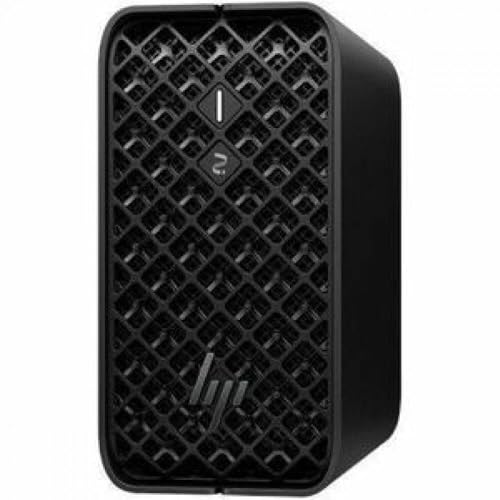
HP built the Z2 Mini G1a around AMD’s Ryzen AI Max PRO silicon, and the unified memory design is the reason it earns its place here. Because the Radeon graphics share the same 32GB pool as the processor, workloads that allocate graphics memory dynamically, such as local language models and memory-hungry 3D scenes, are not squeezed into a small fixed frame buffer. This factory configuration, model BN4F7UT#ABA, pairs the PRO 385 processor with a 1TB NVMe drive and Windows 11 Pro, making it the most distinctive alternative to the Intel-based ThinkStations in this group.
Specs
- Processor: AMD Ryzen AI Max PRO 385
- Graphics: AMD Radeon 8050S
- Memory: 32GB RAM, unified memory architecture
- Storage: 1TB SSD, NVMe controller, RAID levels 0 and 1 supported
- Operating system: Windows 11 Pro
- Model number: BN4F7UT#ABA
- Colour: Jet Black
Best for: Engineers and developers running local AI models or unified-memory-friendly 3D work in a mini chassis.
Watch out for: The graphics name in this listing’s title differs from the pairing shown for the same processor in some HP configuration pages, so check the graphics line on the product page matches what you expect before ordering.
ASIN: B0FF4V3HBK
Lenovo ThinkStation P3 Ultra SFF Gen 2 (Core Ultra 7 265, RTX 2000 Ada, 32GB, 1TB)

For mainstream professional work, this configuration hits a practical balance: the RTX 2000 Ada brings 16GB of dedicated GDDR6 graphics memory, the Core Ultra 7 265 vPro keeps office management options open, and the Gen 5 SSD loads big project files quickly. The listing is unusually complete, spelling out DDR5-5600 SODIMM memory that can be revisited later, a 330W power adapter, three rear DisplayPort connectors and a three-year on-site warranty. It suits CAD and BIM users who want a certified workstation that disappears behind a monitor yet still feels responsive with several applications open.
Specs
- Processor: Intel Core Ultra 7 265 vPro, P-cores up to 5.20 GHz
- Graphics: NVIDIA RTX 2000 Ada Generation, 16GB GDDR6
- Memory: 32GB DDR5-5600MT/s (SODIMM)
- Storage: 1TB SSD M.2 2280 PCIe Gen5 Performance TLC Opal
- Connectivity: Intel Wi-Fi 7 BE200, Bluetooth 5.4
- Rear ports: 4x USB-A (USB 10Gbps), 3x DisplayPort 1.2, 1x Ethernet (GbE RJ-45)
- Power supply: 330W adapter
- Operating system: Windows 11 Pro
- Warranty: 3-year on-site
Best for: CAD and BIM professionals who want dedicated graphics memory and Gen 5 storage in a sub-4-litre box.
Watch out for: Confirm a live offer on this exact ASIN before ordering, because the availability snapshot behind this configuration is older than the evidence for the other picks here.
ASIN: B0FZWNCPKS
Lenovo ThinkStation P3 Tiny (Core i7-14700, T400, 32GB, 1TB)

The P3 Tiny is the space-saver of the group, a roughly one-litre workstation built for desks where the computer must mount out of sight or share room with several monitors. Its 20-core Core i7-14700 handles office and light CAD workloads with ease, the listing states support for up to five displays, and the package includes the 300W power adapter plus a USB keyboard and mouse. The NVIDIA T400 is an entry professional card, fine for 2D work, viewing and lighter 3D, so treat this model as the multi-screen productivity pick rather than a rendering machine.
Specs
- Processor: Intel Core i7-14700, 20 cores
- Graphics: NVIDIA T400
- Memory: 32GB DDR5 RAM
- Storage: 1TB SSD
- Video output: DisplayPort and HDMI, up to 5 displays
- Connectivity: Wi-Fi and Ethernet
- Included: 300W power adapter, USB keyboard, USB mouse
- Operating system: Windows 11 Pro
- Weight: 3 pounds
Best for: Space-limited desks running many monitors, 2D CAD, viewing and everyday professional applications.
Watch out for: Resellers configure these machines to order, so verify the listing you buy from states the T400 graphics and 32GB memory exactly as configured here.
ASIN: B0FM8C9BLL
Which One Fits Your Situation
Your assemblies and renders keep outgrowing your current machine
Choose the Core Ultra 9 configuration of the ThinkStation P3 Ultra SFF Gen 2. Its RTX 4000 SFF Ada is the only card in this roundup aimed squarely at GPU rendering and very large scenes, and the combination of 64GB of memory with a 2TB Gen 5 SSD removes the two bottlenecks that usually appear first as projects grow. Nothing else here offers the same headroom without moving up to a tower.
You develop or test local AI models at your desk
The HP Z2 Mini G1a fits this work because its unified memory pool lets the Radeon graphics use a large share of the 32GB installed, which suits model loading and experimentation that would stall on a small fixed graphics buffer. Its Ryzen AI Max PRO 385 also keeps processor performance strong for the data preparation and compiling that surround model work, all inside a mini chassis that mounts almost anywhere.
You run mainstream CAD or BIM all day, every day
The Core Ultra 7 configuration of the P3 Ultra is the balanced pick: 16GB of dedicated graphics memory for solid modelling, a Gen 5 SSD for fast project loads, SODIMM memory you can revisit later, and a three-year on-site warranty in the listing. It avoids paying for rendering capacity you will not use while still leaving room for projects to grow over the machine’s working life.
Your desk is mostly monitors and desk space is gone
Take the ThinkStation P3 Tiny. It is the smallest machine here, its listing claims support for up to five displays, and the included keyboard, mouse and adapter mean one box completes the setup. For viewing, 2D drafting, documentation and office applications across many screens, its entry-level T400 graphics are enough, and the space you save can go to an extra monitor instead.
Common Mistakes
- Buying a consumer mini PC for professional applications and discovering your CAD vendor does not support its graphics driver path.
- Ordering a unified or soldered memory machine at the minimum capacity, then finding the memory can never be increased.
- Assuming every listing for the same chassis carries the same graphics card, when sellers offer several GPU tiers under near-identical titles.
- Counting monitors after purchase and realising the machine has fewer display outputs than your desk setup needs.
- Expecting to fit a full-height desktop graphics card later, when these chassis accept only the factory-fitted low-profile configuration.
Frequently Asked Questions
Can a mini workstation genuinely run professional CAD software?
Yes, provided the graphics tier matches the work. The machines here carry professional NVIDIA RTX or T-series cards, or workstation-class Radeon graphics, with drivers aimed at CAD and engineering applications. Light and mainstream modelling runs comfortably; extremely large assemblies and long renders still favour the strongest card in the group, the RTX 4000 SFF Ada configuration.
What does workstation certification actually change for a buyer?
Certification means the manufacturer has validated the machine against professional application suites, so drivers and hardware are supported as a combination by both sides. In practice it reduces the risk of display glitches, crashes in certified applications and support dead ends. Listings do not always spell out certification lists, so check the manufacturer’s page for your specific application before ordering.
Can I upgrade the memory or graphics later in these machines?
Memory depends on the design. The ThinkStation models use DDR5 SODIMM modules, so capacity can usually be raised within the stated ceiling, while the HP’s unified memory is fixed at purchase. Graphics are effectively fixed in every machine here, because the chassis and power supply are built around the fitted card. Buy the graphics tier you will need in two years, not just today.
Is a mini workstation or a small tower better for professional applications?
Choose the mini when desk space, noise or mounting matter and your workloads fit the graphics tiers above. Choose a tower when you expect to swap graphics cards, add several internal drives or run sustained rendering that benefits from larger cooling. For most CAD, BIM and development desks, a well-specified mini workstation covers the work while leaving the desk clear.
FAQ
Can a mini workstation genuinely run professional CAD software?
What does workstation certification actually change for a buyer?
Can I upgrade the memory or graphics later in these machines?
Is a mini workstation or a small tower better for professional applications?
More from Amazon
Programs that pair well with the guide above. Offers and eligibility are set by Amazon and may change.
Free shipping on eligible items, Prime Video and more. Eligible new members can start with a free trial.
Start a Prime free trialAudiobooks and podcasts to listen to on the go. Eligible new members can start with a free trial.
Try Audible freeAd-free music streaming. Eligible new subscribers can start with a free trial.
Try Music Unlimited freeA free business account with business pricing and bulk-buying tools for work, shop or home office.
Create a business accountAs an Amazon Associate we earn from qualifying purchases.





Write Your Review
No reviews yet. Be the first to share your experience!